 Saskia Teichmann
Cloudflare now shows how brands appear in a recurring AI prompt panel. Google tracks organic link impressions in AI Overviews and AI Mode. This reflects an ad, not human attention. Your web analytics only begin when a user clicks. Those who clearly distinguish between these signals won’t receive an overall AI visibility score, but they will get a useful diagnosis.
Cloudflare's new AEO Visibility Dashboard (AEO stands for Answer Engine Optimization) displays four metrics. Its true editorial value lies in the measurement chain behind it: Cloudflare brings together technical agent readiness, synthetic tests of AI responses, and real-world crawl and referral signals into a single interface.
Since June, Google has added a dedicated report for generative AI impressions to Search Console. This report tracks something different: how often Google displays a link to your website in AI Overviews or AI Mode has recorded an organic impression. It is not possible to determine from this whether the person consciously noticed the link.
And then there's GA4, Plausible, or your own analytics setup. They track visits to the website and what happens afterward.
All three perspectives are useful. Things get murky when a synthetic prompt test is treated as supposed reach, a bot query as a citation, or a few clicks as a diagnosis of „invisible.“.
A measurement chain and five questions
I wouldn't treat AI Visibility and AI Traffic as a single metric, but rather as five consecutive questions:
- Is your website accessible to relevant systems, and is it being crawled?
- Is your brand or website mentioned or cited in the responses that were tested?
- Did Google record an organic impression for a link?
- Did anyone click and visit your website?
- What happened next—leading up to an inquiry, a purchase, or some other meaningful outcome?
This sequence is not a universally applicable AI funnel. Not every platform discloses all stages, and a click may not be attributable to a previously observed citation. As a validation model, however, it prevents you from comparing metrics that come from different contexts.
| Measurement point | Typical Data Source | What You Really Know | What Remains Unresolved |
|---|---|---|---|
| Accessibility and Crawling | Agent Readiness Checks, Server/Edge Logs, Local Bot Analytics | A system was allowed or able to retrieve a URL | whether the page was used in a response |
| Mention and Citation | repeated, documented prompt panel | The brand or domain appeared in the responses that were tested | how often real users viewed them |
| Link impressions recorded by Google | Search Console, „Generative AI“ Report“ | Google recorded an organic impression for a website link in AI Overviews or AI Mode | Conscious awareness, isolated Gen AI clicks, queries, and conversions |
| Click | GA4, Plausible CE, other web analytics | A recognized visitor accessed the website | All unrecognized or referrerless visits |
| Post-Click Effect | Events, Store/CRM Data, Funnel Analysis | What Happened After the Visit Was Detected in Our Own Monitoring System | what unobserved factors contributed to the decision |
1. "Available" does not mean "selected"
The first checkpoint comes before each answer. Can a crawler access your robots.txt And does it read the sitemap? Does it reach the page? Does it get content or a 403? Does a link lead nowhere and result in a 404?
Cloudflare groups these technical checks under Agent Readiness. The corresponding AI Operator Activity It also shows actual crawl and referral activity on the Cloudflare network, broken down by operator. There, for example, you can see that a provider is fetching many pages but isn’t sending any visible referrals, or that its requests are failing due to 403 and 404 responses.
These are actual logs from the website. They show what a system requested from the site and what response the server provided. They do not show what was included in a private assistant's response later on.
Regardless of Cloudflare, you'll find the same set of evidence in server logs or your own bot analysis. If WordPress is part of your stack, you can citelayer® Analyze AI bot requests and detected AI referrals separately on a local basis. I am deliberately not specifying a fixed number of supported bots because detection patterns vary by release.
2. Cloudflare AEO Visibility does not count responses completely
Cloudflare launched the AEO Visibility Dashboard on August 6, 2026, as Early Access Introduced. Access is requested in the Overview tab of the Cloudflare Dashboard. It is therefore not yet a standard feature that has been rolled out to everyone.
The interface answers the question of how a website performs in a response panel generated by Cloudflare. To do this, Cloudflare derives the website’s industry and category and formulates likely questions for unbranded discovery, recommendations, comparisons, and general advice. The official pipeline diagram also mentions custom prompts. Currently, Cloudflare asks Claude from Anthropic and GPT from OpenAI from.
Four values are at the core:
- Citation Rate: What percentage of the responses tested within this category cite their own website as a source?
- Mention Rate: How often does the answer mention the brand—regardless of whether the website is linked as a source?
- Prominence: When the website is cited, how early does it appear, and how much of the answer is attributed to it?
- Share of Voice: What percentage of the citations in the panel come from your own website compared to competitors?
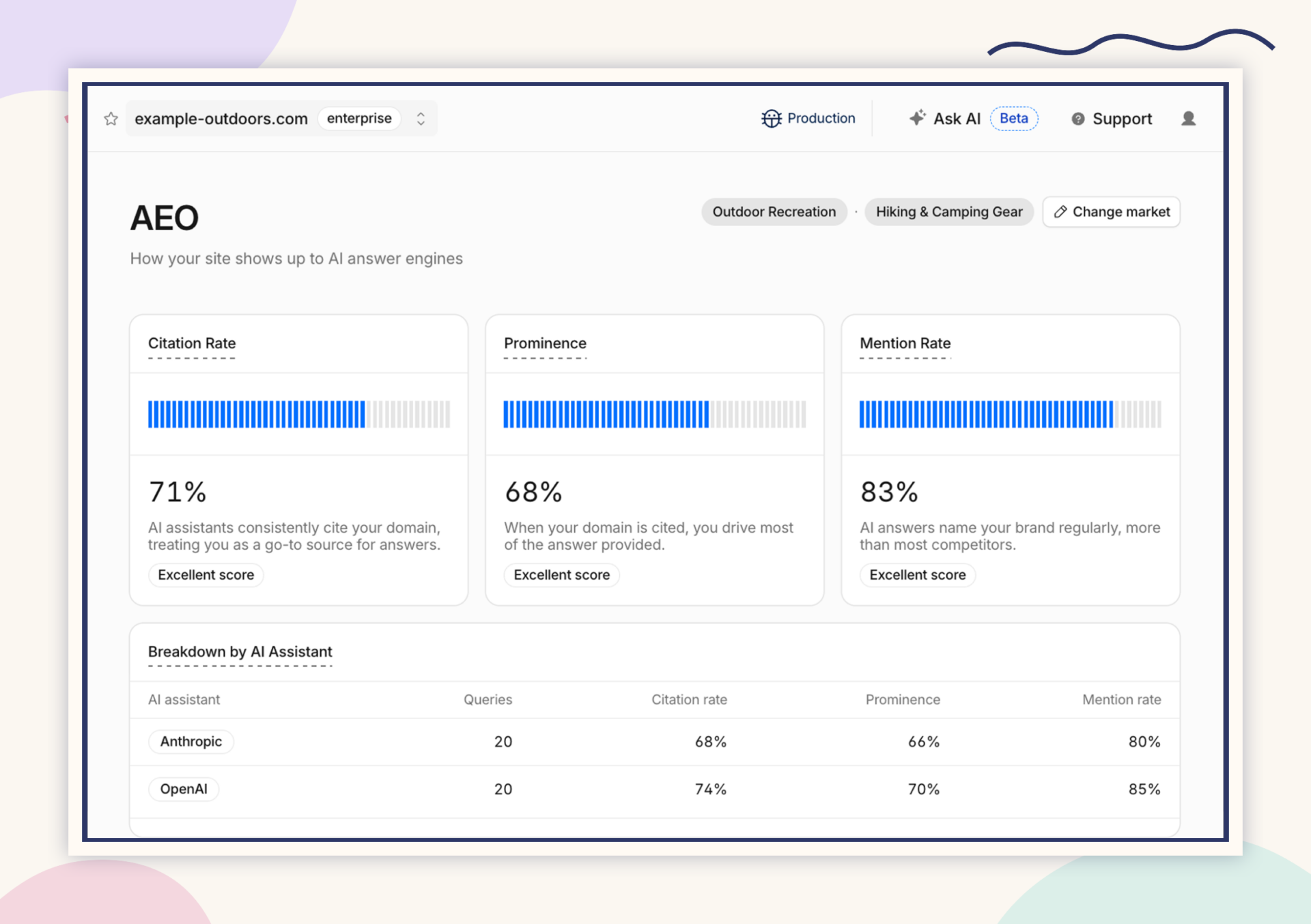
This method goes beyond an occasional manual prompt because Cloudflare explicitly takes the variance among models into account. According to the methodology blog, prompts are run multiple times across different models via AI Gateway. The response text and cited sources are then evaluated. To do this, Cloudflare combines deterministic text analysis with an assessment by Workers AI, when a nuanced assessment is needed.
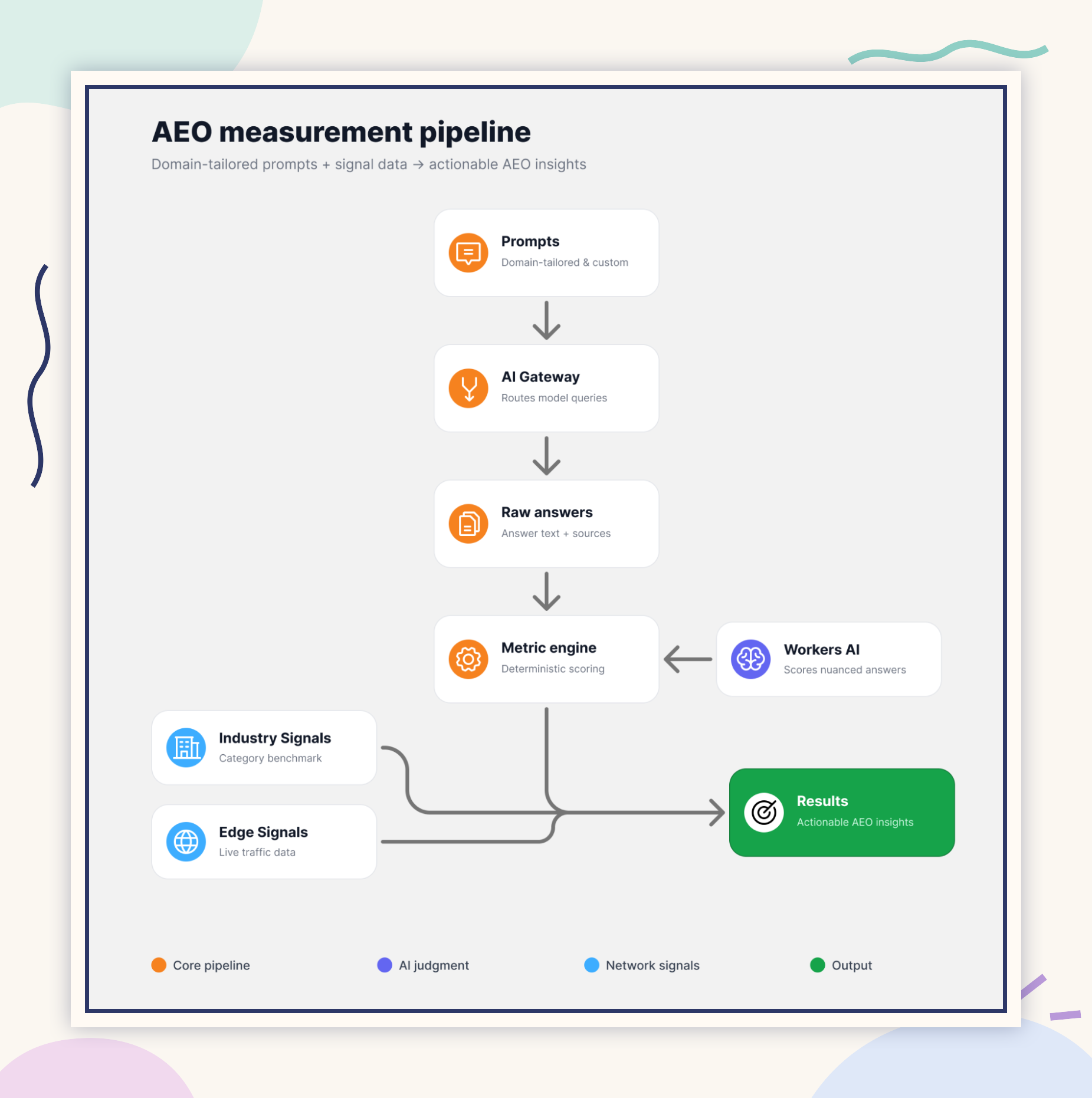
For market comparison, Cloudflare generates an industry panel once per category. This snapshot serves as a reusable baseline for domains in the same category, rather than asking all comparison questions anew with every scan. This makes results available more quickly and establishes a common frame of reference. However, it also means that the timeliness and relevance of this panel are integral to the measurement method.
What these percentages are not
Citation Rate, Mention Rate, Prominence, and Share of Voice are No complete count of actual user responses. To this end, Cloudflare monitors questions it generates itself and the responses from selected models. The panel can serve as a useful, repeatable sample. It is neither an AI ranking nor an indicator of overall market visibility.
Even Cloudflare's real-time network data doesn't fully close this gap. It shows crawls and referrals to the website. It doesn't show every response a user has read in a private browser window.
That’s exactly why I still find the shared interface fascinating: it juxtaposes technical readiness, synthetic response visibility, and real-world network activity. As long as these three types of signals remain distinguishable as such, this constitutes a meaningful triangulation.
What I Still Want to Know About Early Access
The public launch materials explain the general process but leave important questions unanswered:
- How many questions are included in the panel, and how are custom prompts weighted?
- Which languages and regions are covered?
- Which specific model versions are running, and how many iterations do they have?
- How often are the category panel and baseline updated?
- How exactly are "Prominence" and "Industry Fit" calculated?
- How can an incorrectly identified category be corrected, and what is recalculated afterward?
Although the sample UI displays a „Change market“ function, this does not yet constitute complete public method documentation for correction and recalculation. These points are test questions for Early Access, not an invitation to guess.
3. Google counts actual generative AI impressions
Google Search Console fills a gap in the measurement chain in an area that usually goes unnoticed by other tools: Google can track when it has actually displayed a link within its own generative AI feature.
The New Report Generative AI currently includes AI Overviews and AI Mode. Google records an organic impression when a link to your website is displayed to a user. This is based on the link being displayed in the supported feature, not on the user’s conscious awareness of the link. Experiments in Search Labs are expressly excluded.
Unlike Cloudflare’s Citation Rate, this metric is not derived from real-time monitoring. It describes an organic link impression recorded by Google within Google Search. However, it is not cross-platform: The report does not include data on Claude, ChatGPT, or other chatbots.
Google is initially rolling out the view to only one Subset of Properties . If it's missing, it may be due to a limited rollout or too few impressions. An exclusion via the separate Search Generative AI control can also prevent participation.
In the dedicated view, you can sort impressions by Pages, Countries, Data, and Devices Analyze. There is currently no "Query" tab there. Likewise, this special report does not currently show isolated Gen AI clicks, a separate CTR, or position.
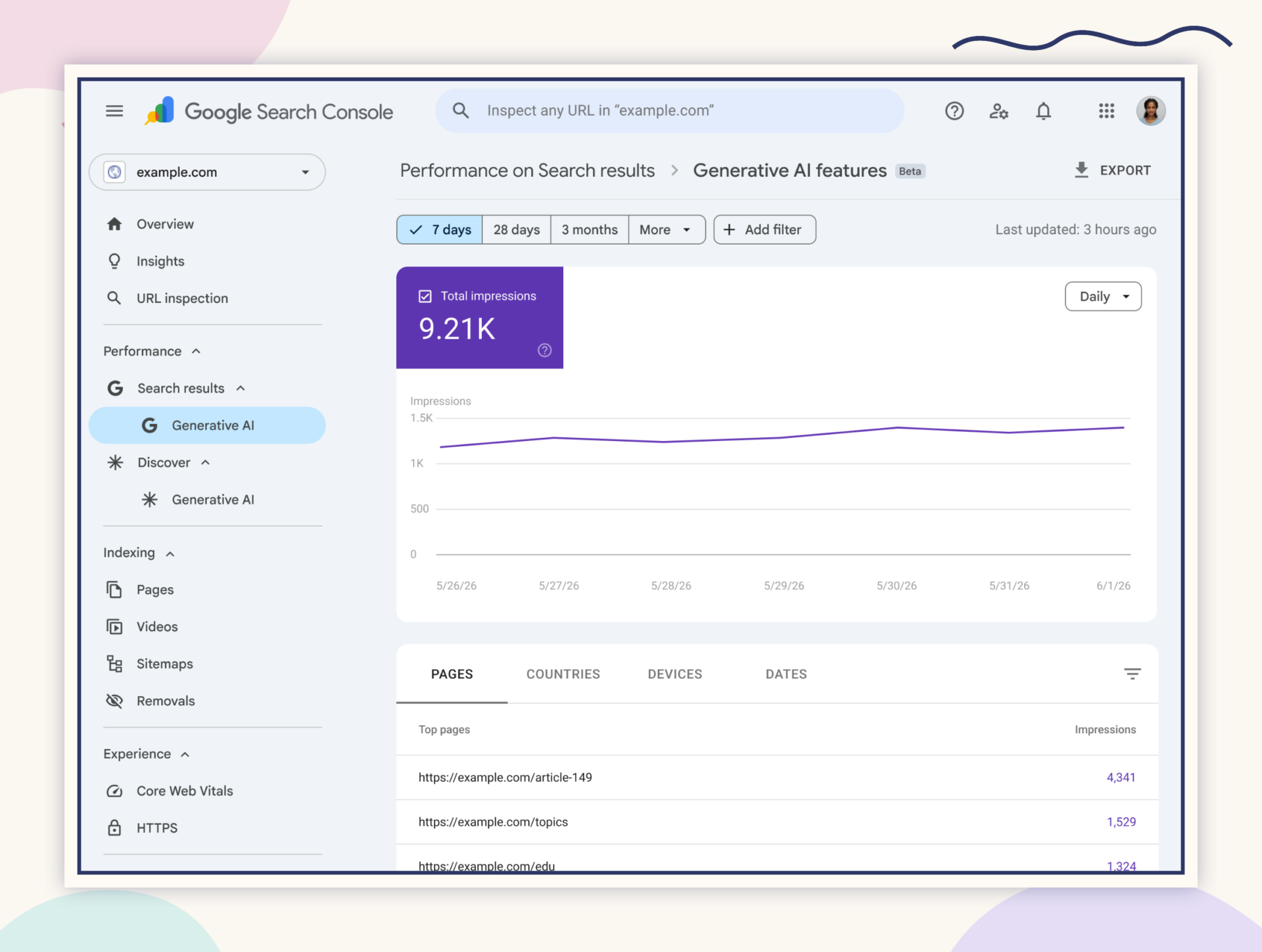
The data in question is also included in the web search section of the standard Search Performance report. There, it remains aggregated with other web search results. The special report thus provides a separate view of Gen AI impressions, but does not yet offer a complete Gen AI funnel.
Four boundaries are important for detailed work:
- By default, the chart aggregates at the property level. If two results from the same website are displayed in a generative AI feature, they are counted together as a single impression. When you use the URL filter, aggregation switches to the URL level.
- In the table, pages are aggregated at the page level; countries, devices, and data are aggregated at the property level. Therefore, the totals in the table and charts may differ from one another.
- The usual limitations of the Search Performance Report also apply here, including a maximum of 1,000 table rows and the standard time-period limits.
- The most recent data may be preliminary and subject to change. The chart and table can be exported.
In practice, this means: The report answers „Was a Google link displayed in a supported generative AI feature?“ He hasn't answered that question separately yet „Which question led to this, who clicked, and what happened next?“
4. The click begins in your web analytics
Since May 13, 2026, Google Analytics has been assigning recognized referrers from AI assistants to the channel AI Assistant GA sets the medium to ai-assistant and the campaign at (ai-assistant). Google cites ChatGPT, Gemini, Deepseek, Copilot, and Grok as examples; this is not an exhaustive list of references.
In contrast, clicks from Google AI Overviews and AI Mode are tracked in GA4 under Organic Search. As a result, the same umbrella term „AI“ appears in different analysis paths depending on its source. A small number in the AI Assistant channel therefore does not disprove the existence of generative AI impressions in Search Console.
Here's how to test the click layer:
- In GA4, open an Acquisition report and use the dimension Session – Standard Channel Group.
- Check whether AI Assistant appears as a line.
- Filter by medium in an exploration
ai-assistantand update the landing page. - Compare the results with referral sources and organic Google search. Not every AI domain is necessarily included in Google's maintained list, and not every visit includes a usable referrer.
GA4 is just one example. With a self-hosted Plausible Community Edition You can track referrals, campaigns, and your own events within an infrastructure of your choice. This gives you more control over the data flow. It’s not a blanket exemption from data protection or consent requirements: tracking, additional properties, hosting, and the legal basis must align with your specific setup.
5. Once you click, the actual business question begins
A referral is interesting, but unfortunately it doesn't mean a conversion just yet. Only the post-click phase reveals whether someone reaches the right landing page, takes a meaningful next step, makes an inquiry, or makes a purchase.
Plausible CE can model this layer using its own events. For a more in-depth, data-privacy-sensitive analysis, I am developing a project under the working title Funnelboard A standalone analysis interface for Plausible CE (a free analysis software that can be run on your own server).
At the currently documented stage of development, Funnelboard runs alongside Plausible CE, reads Analytics data in read-only mode, and uses it to calculate funnels, revenue by source, and common journeys. For this analysis, the Analytics data remains within the company’s own infrastructure in the setup described; the EDD license check is intended to be performed externally. At this time, this statement regarding the development status neither replaces a legal review nor constitutes a guarantee of any future mode of operation.
In this model, WordPress can serve as an online store, a content management system, or a source of additional local signals. The five metrics work just as well for other CMS platforms, online stores, and custom-developed platforms.
Three Evidence Families Instead of a Single AI Visibility Score
The five measurement points can be traced back to three families of evidence:
- Synthetic response observation: Cloudflare's AEO panel or your own documented prompt monitoring shows what happens in a defined sample.
- Real-world system signals: Edge/server logs, Cloudflare Operator Activity, and Google's generative AI impressions show the activity observed in the respective systems.
- Our own usage and impact data: Web analytics, events, and e-commerce or CRM data show the recognized visit and what happens afterward within the company's own tracking scope.
No one family can replace another. Together, they help establish a reliable diagnosis:
- Unreachable or many 403/404 errors: Check technical approval, URL structure, and crawlability.
- Crawls, but no citations in the panel: Examine intent alignment, source value, market assignment, and prompt set.
- Panel citations, but no actual Google impressions: Be aware of platform limitations; a prompt-based sample and Google search results are not the same thing.
- Google impressions, but hardly any clicks: Check link display, ad copy, landing page, and measurement gaps—without assuming a value of zero just because there are no isolated GSC click counts.
- Clicks, but no corresponding effect: Examine the landing page, offer, funnel, customer journey, and event concept.
Cloudflare’s new dashboard therefore does not replace Google Search Console, web analytics, logs, or post-click analysis. It complements them by offering an interesting new perspective. Google now provides a separately trackable, recorded organic link impression for its own generative AI platforms. Whether it garnered attention and what business opportunities it will yield must be verified using other data sources.
If you want to get the basics straight first, read What is AI Visibility?. I describe how to design reproducible tests in My Approach to AI Visibility Audits with citelayer®. For technical crawlability, the next step is AI Crawlers, robots.txt, and Content Signals.
A citelayer® AI Visibility Audit can consolidate the metrics for your website into a reliable baseline—without any promises regarding traffic, citations, or rankings.
Sources
- Cloudflare: How the New AEO Visibility Dashboard Works
- Cloudflare: Press Release on Early Access
- Google Search Central: New Reports for Generative AI Impressions
- Google Search Console: Generative AI Performance Report
- Google Analytics: AI Assistant in the Release Notes
- Google Analytics: Defining the Default Channel Groups
- Plausible: Hosting the Community Edition Yourself
- Plausible: Analyzing Referrers and Campaigns
- Plausible: Create Your Own Events





Discussion on the post
0 comments